.png)
What Is Industrial Labeling Software?
Industrial labeling software designs, standardizes, and manages workplace safety and compliance labels across facilities. It embeds required regulatory elements into templates, so labels meet Occupational Safety and Health Administration (OSHA), American National Standards Institute (ANSI), National Fire Protection Association (NFPA), and Globally Harmonized System (GHS) labeling requirements without relying on manual formatting.
Industrial labeling software supports:
- Electrical and arc flash labeling under NFPA standards
- Hazard Communication (HazCom) container labeling under GHS requirements
- Pipe marking aligned with ANSI and ASME standards
- 5S and Lean manufacturing visual controls
- Spreadsheet data merging for high-volume compliance labeling
- Custom safety signage for site-specific hazards
- Consistent labeling across multiple facilities
- Audit readiness through standardized labeling systems
Regulatory standards define what must be labeled and how it must appear. Industrial labeling software ensures that those requirements are applied consistently across facilities.
The Compliance Cost of Inconsistent Labeling
Labeling failures rarely start with a single mistake. They often develop gradually when responsibility for labeling is spread across departments without a shared system for managing templates.
In many organizations:
- Engineering updates arc flash studies
- Environmental Health and Safety (EHS) manages HazCom programs
- Maintenance creates equipment identification labels
- Contractors apply temporary markings during installation or retrofit projects
Each department often relies on its own templates and formatting standards. Over time, labeling practices begin to vary and updates are applied unevenly across the facility.
Arc flash calculations may be revised without updating equipment labels. Changes to Safety Data Sheet (SDS) may not result in updated container labeling. Pipe identification installed during construction may not match labels added during later maintenance work. Floor markings fade and are replaced without consistent dimensions or color standards.
These gaps become visible during inspections. OSHA evaluates labeling under multiple standards, including HazCom and electrical safety provisions. Missing elements, outdated calculations, or inconsistent formatting are documented as violations, regardless of intent.
In many cases, the issue is structural, rather than procedural. When labeling templates are stored locally and recreated by different teams, variation becomes unavoidable.
Industrial labeling software helps address this problem by centralizing templates and standardizing required data fields. Instead of relying on individual departments to recreate labels, organizations can maintain a shared labeling framework that keeps formatting, hazard information, and regulatory elements consistent across operations.
DuraLabel® LabelForge® PRO Design Software is designed to support this approach by managing labeling templates from a centralized system. With controlled templates and standardized formatting, labeling becomes part of a structured compliance program rather than a disconnected task.
Labeling as a Control Mechanism in Regulated Environments
OSHA compliance labeling requirements, along with standards issued by NFPA and ANSI, are enforced through visible communication in the workplace. Labels translate regulatory language into clear operational instruction.
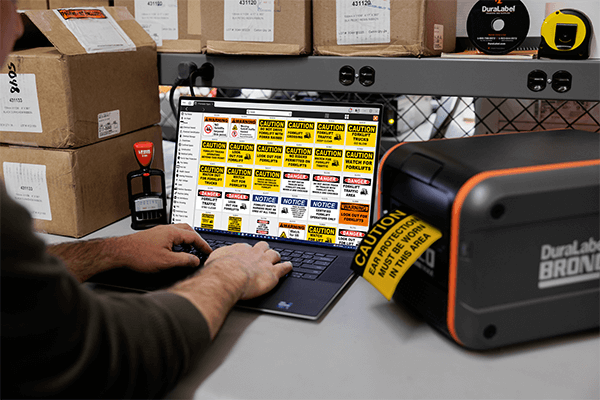
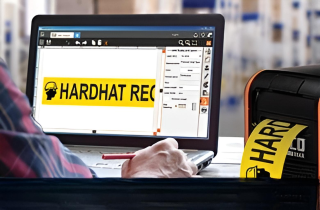
DuraLabel Labelforge PRO desktop industrial label design software printing HazCom compliant labels for chemical labeling.
Arc flash boundaries, hazard classifications, pipe contents, and restricted access areas are defined through regulation and engineering analysis. Workers receive that information through physical markers and printed labels. When those identifiers are inaccurate or inconsistent, compliance weakens and workers may not have the information they need to guide or protect them.
Most compliance programs are well documented through written policies, engineering studies, and digital records. Labels, however, are often created locally by different personnel across departments or facilities. Without shared template control, field communication can gradually drift from documented safety requirements.
LabelForge PRO supports this approach by allowing organizations to manage labeling templates from a centralized system. When standards or internal policies change, updates can be applied consistently across facilities, helping maintain alignment between documented programs, engineering data, and the labels workers rely on in the field.
Where Industrial Labeling Systems Intersect with Regulatory Risk
Industrial labeling requirements span multiple regulatory frameworks. Electrical systems, chemical management programs, mechanical infrastructure, production areas, and visual safety systems all operate under different standards and enforcement expectations. Despite these differences, each relies on clear, visible communication in the workplace.
Labels communicate regulatory requirements directly to workers where the information is needed. Whether identifying energized equipment, chemical hazards, pipe contents, or designated work areas, they provide critical safety information at the point of use.
Key regulatory areas where labeling plays a central role include:
- Arc flash labeling under NFPA standards
- HazCom container labeling aligned with GHS labeling requirements
- Pipe marking standards aligned with ANSI and American Society of Mechanical Engineers (ASME) guidance
- Floor marking used to support OSHA safety requirements
- Visual identifiers used in 5S and Lean manufacturing systems
Although these requirements differ, each depends on consistent labeling across departments. When labeling is created independently by different teams, formatting, terminology, and required elements often begin to vary.
How labeling is managed largely determines whether those variations occur. The comparison below illustrates the difference between decentralized labeling practices and a structured template system.
Decentralized Labeling vs. Structured Templates
|
Decentralized Labeling Practices |
Structured Template Control |
|
Templates stored locally |
Templates centrally managed |
|
Formatting varies by department |
Standardized formatting across facilities |
|
Updates applied inconsistently across departments |
Systematic updates deployed across locations |
|
Required regulatory elements may be omitted |
Required regulatory elements embedded into templates |
|
Documentation and applied labels drift apart |
Documentation and applied labels remain aligned |
|
Inconsistencies surface during inspection |
Consistent labeling supports audit readiness |
Electrical and Arc Flash Labeling Under NFPA Standards
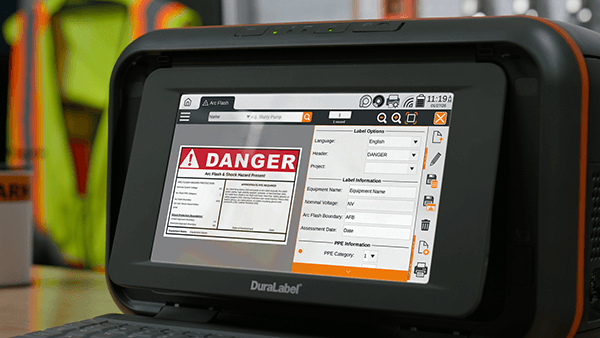
A user designing Arc Flash labels using the DuraLabel Labelforge Pro industrial label design software on a DuraLabel Toro Max Industrial Label and Sign Print System.
Electrical safety programs are among the most technically demanding areas of workplace compliance. Under NFPA 70E, equipment that may require examination or servicing while energized must be field-marked with arc flash information based on engineering analysis. These labels communicate critical details such as incident energy levels, arc flash boundaries, nominal system voltage, and shock protection parameters.
Arc flash studies are updated when equipment is modified, systems are expanded, or protective devices are adjusted. When revised calculations are not reflected in field labels, discrepancies form between documented engineering data and the warnings workers rely on at the equipment.
Standardized labeling templates help close this gap by structuring arc flash labels around NFPA 70E requirements. Defined data fields ensure calculated values appear in the correct location and maintain consistent formatting across equipment and facilities. When engineering data changes, labels can be updated using the same template structure rather than recreated independently. LabelForge PRO Design Software supports this approach by allowing organizations to manage arc flash label templates from a centralized system and update hazard information as electrical systems change.
GHS Compliance and Hazard Communication Labeling
Hazard Communication (HazCom) remains one of the most frequently cited areas of OSHA enforcement. The HazCom Standard requires that chemical hazards be communicated through structured labeling aligned with GHS. Labels must include the following elements:
- Product identifier
- Signal word
- Hazard statements
- Pictograms
- Precautionary statements
- Supplier identification
A written program alone does not satisfy compliance requirements. Inspectors ensure container labels reflect current classifications and consistently meet GHS requirements across both primary and secondary containers.
Facilities managing large chemical inventories often encounter labeling inconsistencies when templates are not centrally managed. SDS revisions may change hazard categories or precautionary language. When labeling files are stored locally or recreated manually, updates may not be applied consistently, and container labels can fall out of compliance.
LabelForge PRO strengthens HazCom programs by embedding required GHS labeling elements into standardized templates. Structured fields define signal word placement, pictogram inclusion, and hazard statement formatting. When chemical classifications or internal policies change, templates can be updated centrally and applied across departments and facilities.
Consistent container labeling supports regulatory compliance and ensures workers can quickly recognize chemical hazards wherever hazardous materials are used or stored.
Pipe Marking and Mechanical System Identification
Pipe marking supports operational clarity and emergency response. ANSI and ASME pipe marking standards define requirements for pipe content identification, color coding, and flow direction indicators.
Mechanical systems change as facilities are expanded, renovated, or modified. Additional piping is installed and labeled at different points in time, often by different teams. Without centralized control, variations in formatting, abbreviations, and directional indicators accumulate. Inconsistent pipe labeling complicates maintenance, slows troubleshooting, and increases risk during emergency response.
LabelForge PRO Design Software supports standardized pipe marking through controlled templates aligned with ANSI and ASME guidance and internal specifications. Required content fields and defined formatting parameters reduce interpretive variation. As systems are modified, labels are generated from a consistent framework rather than recreated independently.
Consistency in pipe identification depends on a repeatable structure. By centralizing template management, LabelForge PRO maintains continuity across installations and modifications, reinforcing both regulatory alignment and operational efficiency.
5S and Lean Manufacturing Visual Controls
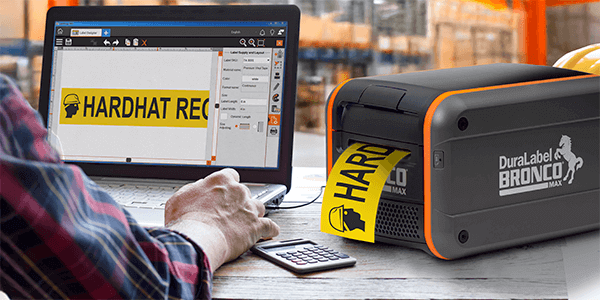
A user designing custom floor marking using DuraLabel LabelForge PRO industrial label design software, printing floor marking from a Bronco Max Industrial Label and Sign Print System.
Lean manufacturing depends on visual clarity to sustain operational discipline. The 5S methodology—Sort, Set in Order, Shine, Standardize, and Sustain—relies on clearly identified storage locations, equipment zones, inspection points, and workflow boundaries. Visual controls act as signals that reinforce order and accountability.
Without standardized labeling practices, these signals lose precision. Individual departments may create localized signage or identification systems that diverge from broader organizational conventions. Terminology varies. Formatting shifts. Over time, inconsistency weakens the visual structure required to maintain Lean processes, particularly in multi-line or multi-site operations.
LabelForge PRO supports 5S initiatives and Lean manufacturing by enabling the development of controlled templates for visual workplace identifiers, red tag areas, equipment labeling, and instructional signage. Centralized template management promotes consistent terminology, formatting, and symbol usage across production areas. As facilities expand or reorganize, updated identifiers can be implemented systematically rather than recreated independently.
Lean manufacturing goes beyond labeling, but visual systems only work when applied consistently. LabelForge PRO standardizes how workplace labels are created and distributed, reinforcing the Standardize and Sustain principles that keep processes stable over time.
Data Merging for High-Volume Compliance Labeling
Many compliance labeling tasks require large numbers of labels that share the same structure but contain different information. Equipment identification labels, chemical containers, electrical panels, and asset markers often follow this pattern. Each label must meet the same formatting requirements while displaying unique data.
Creating these labels one at a time increases the risk of inconsistency. Manual entry can introduce formatting changes, missing information, or typographical errors. When multiple departments create labels independently, those small differences can accumulate and reduce clarity across the facility.
LabelForge PRO Design Software addresses this challenge through spreadsheet data merging. A standardized label template can be connected to a spreadsheet that contains the variable information for each label. Data fields may include:
- Equipment identifiers
- Asset numbers
- Chemical container information
- Electrical panel data
The software inserts the information automatically while preserving the template structure. For facilities managing hundreds or thousands of identifiers, data merging allows labels to be produced efficiently while maintaining consistent formatting.
Custom Safety Signage Across Industries
Standardized labels do not address every hazard. Facilities must also communicate site-specific risks, procedural controls, restricted access zones, and operational instructions that fall outside predefined categories. Custom signage fills those gaps.
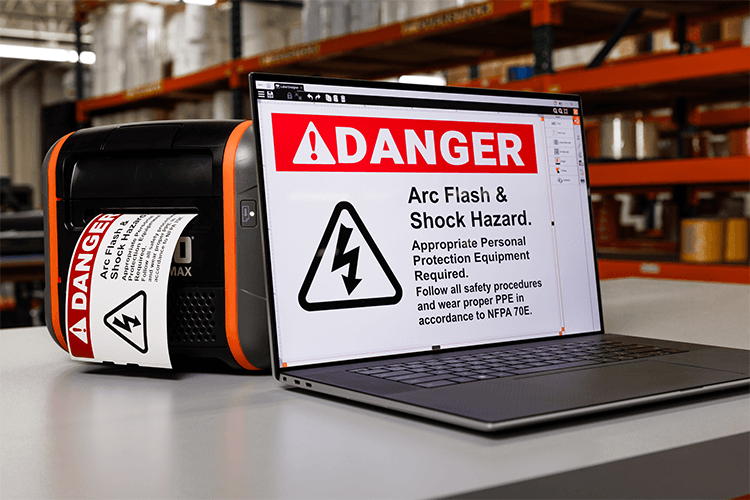
A user designing custom OSHA compliant electrical safety labels using DuraLabel LabelForge PRO industrial label design software.
Without centralized controls, custom signs often drift from established formatting standards. Common inconsistencies include:
- Signal word panels that vary in format or hierarchy
- Inconsistent use of hazard symbols
- Color schemes that do not align with ANSI guidelines
- Typography that differs across departments or locations
These variations reduce clarity and weaken visual consistency across the workplace.
LabelForge PRO Design Software supports custom safety signage through standardized templates. Templates incorporate standardized signal word panels, color alignment, and symbol conventions while still allowing site-specific messaging. Custom content is created within defined formatting parameters rather than designed independently.
By generating custom signs from centrally managed templates, organizations maintain consistent visual standards and regulatory alignment across department and facilities while avoiding variation.
Centralized Governance for Multi-Site Compliance Programs
When organizations operate across multiple facilities, they often struggle to keep labeling consistent. Differences in staffing, contractor involvement, and local practices can lead to variation in how labels are created and applied. Even when corporate safety policies are clear, they may be implemented differently from site to site.
In decentralized environments, labeling templates are often stored locally and modified as needed. Departments may adjust language or formatting to solve immediate problems, gradually moving away from company standards. Over time, labeling begins to look different across locations, creating inconsistencies that become visible during audits and inspections.
LabelForge PRO helps organizations manage labeling across multiple facilities through a centralized template system. Standardized templates for arc flash labels, HazCom containers, pipe markers, floor identifiers, and custom signage can be shared across locations. User permissions help prevent unauthorized changes while still allowing teams to create labels when needed.
This structure reduces variation caused by individual interpretation. Instead of relying on local practices, organizations maintain a consistent labeling system that reflects corporate safety policies. When facilities expand or teams change, the labeling structure stays consistent.
Audit Readiness and Documentation Integrity
Regulatory inspections evaluate more than written programs. Inspectors examine whether:
- HazCom elements appear on chemical containers
- Arc flash labels reflect current electrical calculations
- Restricted areas are clearly marked
- Visual safety controls match written policies
Differences between written procedures and field labels often draw attention during inspections. Even small inconsistencies may lead inspectors to examine a program more closely. Keeping labels aligned with written safety policies is an important part of maintaining compliance.
LabelForge PRO Design Software supports audit readiness by standardizing how labels are created across departments and facilities. Centrally managed templates help ensure labels include required information. When policies or regulatory requirements change, updates can be applied consistently rather than recreated independently.
Clear documentation depends on labels matching the programs that support them. By helping organizations keep those elements aligned, LabelForge PRO strengthens the connection between written policies and the labels used in daily operations.
Industrial Labeling Software as a Long-Term Compliance Strategy
Industrial labeling is often treated as an administrative step completed after engineering or safety decisions are made. In regulated workplaces, labels serve a much larger role. They communicate:
- Electrical calculations
- Hazard classifications
- Access restrictions
- Procedural instructions
These labels are enforceable components of safety programs.
Industrial labeling software changes how labeling is managed by creating a structured compliance labeling system instead of relying on individually created labels. Organizations can build a system that supports consistent formatting and required regulatory information across applications. Centralized templates help ensure labels meet regulatory expectations across different applications.
LabelForge PRO supports this approach across electrical safety, HazCom, pipe identification, floor marking, Lean visual controls, and custom signage. By managing templates through one central system, organizations can keep labeling consistent across departments and facilities.
Consistent labeling supports regulatory compliance across facilities. Industrial labeling software helps organizations maintain that consistency.
LabelForge PRO Design Software for Structured Industrial Labeling
Regulatory compliance depends on consistent execution. Industrial labeling software provides the framework that keeps electrical safety, hazard communication, pipe identification, floor marking, Lean visual controls, and custom signage aligned with established standards. Structured template management reduces variation and strengthens internal control.
LabelForge PRO Design Software supports organizations seeking centralized governance over safety labeling programs. It helps standardize regulatory elements across facilities and maintains alignment between engineering analysis, documented policies, and applied labeling. Multi-user management and template control reduce inconsistencies while preserving operational flexibility.
To strengthen your compliance strategy, download the free OSHA Signage Quick Start Guide. This resource outlines practical steps for understanding OSHA labeling requirements, improving workplace safety, and building a consistent visual communication system.
If your facility is evaluating industrial labeling software or needs guidance on improving labeling consistency, call 1-888-789-7964 to speak with a safety specialist.
Read Next:
How Custom Signs Support OSHA Rules and ANSI Signage Requirements
The Case for Custom Workplace Signs in Complex Environments

Why Engineers Rely on LabelForge PRO for OSHA Electrical Safety
What Is LabelForge PRO and What Is It Used For? DuraLabel LabelForge® PRO Design Software is an industrial ...
Read
Hazard Communication Solutions for a Safer Workplace
A faded label. A missing hazard symbol. An outdated SDS. These small details can trigger big problems in ...
Read
When Facilities Should Upgrade an Industrial Label Printer
When Should You Upgrade Your Industrial Label Printer? Facilities should upgrade an industrial label printer ...
ReadTake Action
Print Your Own Signs
Free Label Design Software